|
Points
The word points is used to describe data storage locations
within a DDC system. Data can come from sensors or from software
calculations and logic. Data can also be sent to controlled devices or
software calculations and logic. Each data storage location has a unique
means of identification or addressing.
Direct digital controls (DDC) data can be classified
three different ways - by data type, data flow and data source.
Data Type
Data type is classified as digital, analog or accumulating.
Digital data may also be called discrete data or binary data. The value of
the data is either 0 or 1 and usually represents the state or status of a
set of contacts. Analog data are numeric, decimal numbers and typically
have varying electrical inputs that are a function of temperature,
relative humidity, pressure or some other common HVAC sensed variable.
Accumulating data are also numeric, decimal numbers, where the resulting
sum is stored. This type of data is sometimes called pulse
input.
Data Flow
Data flow refers to whether the data are going into or out of
the DDC component/logic. Input points describe data used as input
information and output points describe data that are output
information.
Data Source
Points can be classified as external points if the data are
received from an external device or sent to an external device. External
points are sometimes referred to as hardware points. External points may
be digital, analog or accumulating and they may be input or output points.
Internal points represent data that are created by the logic of the
control software. These points may be digital, analog or accumulating.
Other terms used to describe these points are virtual points, numeric
points, data points and software points.
Global or in-direct points are terms used to describe data
that are transmitted on the network for use by other controllers. These
points may also be digital, analog or accumulating.
Analog input points typically imply an external point and
represent a value that varies over time. Typical analog inputs for HVAC
applications are temperature, pressure, relative humidity, carbon dioxide
and airflow measurements. Typical analog outputs include control signals
for modulating valve positions, damper positions and variable frequency
drive speed.
Typical digital inputs for HVAC applications represent the
status (example: whether or not the motor is running) of fans, pumps,
motors, lighting contactors, etc. A temperature high limit is considered a
digital input because, although it is monitoring an analog value
(temperature), the information that is transmitted to the controller is a
digital condition (whether or not the temperature has exceeded a defined
value). Digital outputs are typically motors or other devices that are
commanded “on” or “off.” Digital outputs include fans, pumps, two-position
(solenoid) valves, lighting contactors, etc.
A “true” analog output (voltage or current) is a varying DC
voltage or milliamp signal that is used to drive a transducer or
controlled device. Another type of analog output is pulse width modulation
(PWM). PWM is accomplished by monitoring a timed closure of a set of
contacts. The amount of time the contacts are closed is proportional to a
level of performance for the controlled device.
Software
Characteristics
There are basically three
common approaches used to program the logic of DDC systems. They are line
programming, template or menu-based programming and graphical or block
programming.
Line programming-based systems use Basic or FORTRAN-like
languages with HVAC subroutines. A familiarity with computer programming
is helpful in understanding and writing logic for HVAC applications.
Menu-driven, database or template/tabular programming
involves the use of templates for common HVAC logical functions. These
templates contain the detailed parameters necessary for the functioning of
each logical program block. Data flow (how one block is connected to
another or where its data comes from) is programmed in each template.
Graphical or block programming is an extension of tabular
programming in that graphical representations of the individual function
blocks are depicted using graphical symbols connected by data flow lines.
The process is depicted with symbols as on electrical schematics and
pneumatic control diagrams. Graphical diagrams are created and the
detailed data are entered in background menus or screens.
Architecture
System architecture is the term used to describe the
overall local area network or LAN structure, where the operator interfaces
connect to the system and how one may remotely communicate to the system.
It is the map or layout of the system.
The network or LAN is the medium that connects multiple
intelligent devices. It allows these devices to communicate, share
information, display and print information, as well as store data. The
most basic task of the system architecture is to connect the DDC
controllers so that information can be shared between them.
Controller
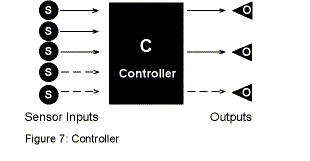
A control loop requires a sensor to measure the process
variable, control logic to process data, as well as calculate an
instruction, and a controlled device to execute the instruction. A
controller is defined as a device that has inputs (sensors), outputs
(controllable devices) and the ability to execute control logic (software)
(Figure 7).
LAN
Communication
Communications between devices on
a network can be characterized as peer-to-peer or polling. On a
peer-to-peer LAN, each device can share information with any other device
on the LAN without going through a communications manager (Figure
8).
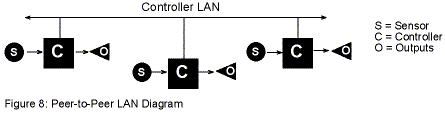
The controllers on the peer-to-peer LAN may be primary
controllers, secondary controllers or they may be a mix of both types of
controllers. The type of controllers that use the peer-to-peer LAN vary
between manufacturers. These controller types are defined later in this
section.
In a polling controller LAN, the individual controllers can
not pass information directly to each other. Instead, data flows from one
controller to the interface and then from the interface to the other
controller (Figure 9).
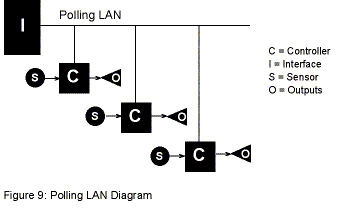
The interface device manages communication between the
polling LAN controllers and the higher levels in the system architecture.
It may also supplement the capability of polling LAN controllers by
providing the following functions: clock functions; buffer for trend data,
alarms, messages; and higher order software support.
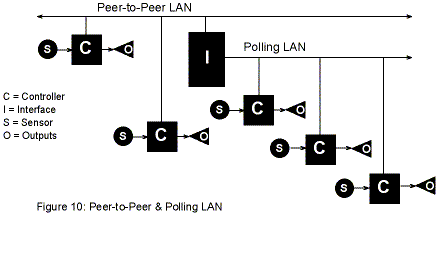
Many systems combine the communications of a peer-to-peer
network with a polling network. In Figure 10, the interface communicates
in a peer-to-peer fashion with the devices on the peer-to-peer LAN. The
polling LAN-based devices can receive data from the peer-to-peer devices,
but the data must flow through the interface.
Controller
Classification
Controllers can be categorized
by their capabilities and their methods of communicating
(controller-to-controller). In general, there are two classifications of
controller - primary control units and secondary control units
Primary controllers typically have the following
features:
- Real-time accurate clock function
- Full software compliment
- Larger total point capacity
- Support for global strategies
- Buffer for alarms/messages/trend & runtime data
- Freeform programming
- Downloadable database
- Higher analog/digital converter resolution
- Built-in communication interface for PC connection.
Secondary controllers typically have the following
features:
- Not necessarily 100% standalone
- Limited software compliment
- Smaller total point count
- Freeform or application specific software
- Typically lower analog-to-digital converter resolution
- Trend data not typically stored at this level
- Typical application is terminal equipment or small
central station equipment.
Operator Interfaces
The next critical element in the system
architecture is an operator interface. Operator interfaces are required
to:
- See data
- Program the system
- Exercise manual control
- Store long term data
- Provide a dynamic graphical interface.
There are five basic types of operator interfaces. They
include:
- Desktop computers which act as operator workstations
- Notebook computers which act as portable operator
workstations
- Keypad type liquid crystal displays
- Handheld consoles/ palmtops/ service tools
- Smart thermostats
Desktop computers are centralized operator workstations
where the main function is programming, building and visualizing system
graphics; long term data collection; and alarm and message filtering.
Notebook computers may connect to the LAN through a
communication interface that stands alone or is built into another device.
The notebook computer connected to the LAN at a particular level may not
have the same capability as a computer connected to the LAN at a higher
level.
Keypad liquid crystal displays typically are limited to
point monitoring and control. They may have some limited programming
capability, such as changing a set point or time schedule.
Handheld consoles, palmtops and service tools are
proprietary devices that connect to primary controllers or secondary
controllers. Typically they allow point monitoring and control, controller
configurations (addressing and communication set-up), and calibration of
inputs and outputs.
Smart thermostats are sensors with additional capabilities.
They connect to secondary controllers and have a service mode to allow for
point monitoring, control and calibration. They also have a user mode that
allows point information to be displayed, setpoint adjustment and an
override mode.
PC/Network
Interface
The communications interface shown in
the Figure 11 is a communication interface device. It provides the path
between devices that do not use the same communications protocol. This
includes computers, modems and printers.
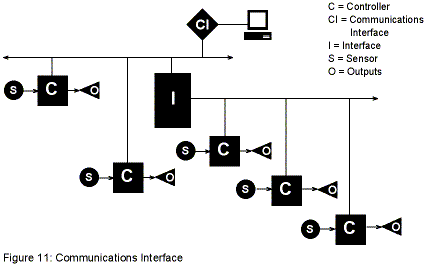
It may be a stand-alone component or it may be built into
another device as shown in Figure 12.
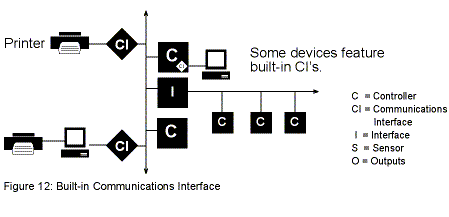
Each communications interface on Figure 12 may:
- Translate protocol
- Provide a communication buffer
- Provide temporary memory storage for information being
passed between the network and the external PC, modem or printer
(mailbox function)
Larger System
Architectures
When systems become larger than
the capacity of a single sub-network, a higher level of architecture is
added to allow the use of multiple sub-networks.
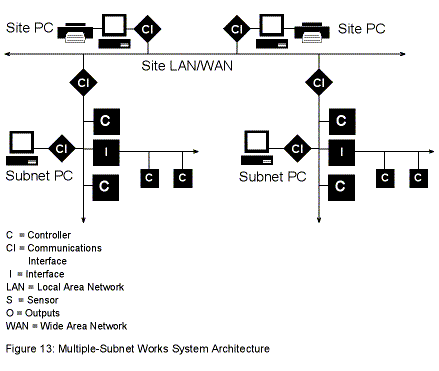
The site LAN wide area network or WAN is used to connect
multiple sub-networks and site computers. Multiple sub-networks can be
connected to a single site LAN/WAN that allows information sharing between
devices on different sub-networks (Figure 13). There may be a limitation
on the number of site computers. The site LAN/WAN may include routers if
TCP/IP is used. If no routers are used, the protocol can be totally
proprietary. If TCP/IP is used, the EMS site LAN/WAN can be the
information system backbone within the facility or between facilities.
Multiple site computers can be added to the site LAN/WAN.
They can connect the site LAN/WAN via a communications interface, which
may be a router. Site LAN/WAN computers can send and receive information
from the entire system. Information can be received by each of the site
computers, but can not be subsequently shared from one computer to
another. Sub-network computers may only be able to see their own
sub-network.
Site LANs allow multiple computers to communicate with each
other. They may use commercially available computer network software and
hardware. Messages, alarms and other data can be re-routed to other
computers on the primary site LAN. Information stored in other computers
can be remotely accessed. This includes graphics, programming and stored
trend and operational data.
Combined
Components
Some vendors combine multiple
functions into a single device. In the following system architecture,
Figure 14, the communication interface is built into the primary
controller. A peer-to-peer LAN or sub-network is connected directly to the
device.
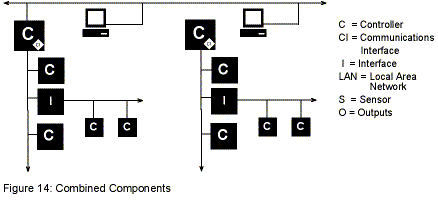
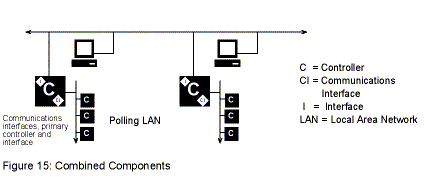
In Figure 15, the key component in the system consists of a
communication interface, a primary controller and an interface to the
secondary polling network.
The addition of a site LAN allows a system to gain size in
terms of the number of devices that are served, but in some applications,
the location of the devices, rather than the number of devices, is the
bigger challenge. In this situation, modem-based communication is used to
expand the geography of the system.
Auto-Answer/Auto-Dial
System Architecture
In auto-answer/auto dial
systems, a specialized communication interface is substituted which
introduces a modem and phone lines into the standard architecture. These
communication interfaces are made with built-in modems or use external
commercial modems. Auto-answer/auto-dial configurations are used to
provide monitoring and access to remote buildings. They are used where
traditional direct-wiring methods are impractical; and where central site
monitoring is desired; or where remote access to controllers is
desired.
In an auto-answer/auto-dial system, the central
communications interface may call the individual sites or vice versa.
Information and data can be passed to and from the layer above the central
communications interface (Figure 16).
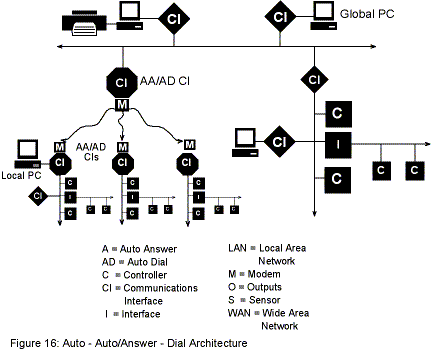
The auto-answer/auto-dial LAN architecture is typically used
by installations with multiple facilities where control and monitoring
needs to be centralized. Multiple LANs are used to maintain the groupings
of devices, or to separate controllers into defined groups.
Multiple Dial LAN
Support
In a system’s architecture, the local
sites have the ability to call an alternate communication interface, if
the primary is not available (Figure 17).

One-Way Dial System
Architecture
One-way dial systems, Figure 18,
are typically used to enable system owners to access their systems from a
remote location, such as their home. It is used where auto-dial monitoring
is not required. It can also be used by the installation and service
company or by the commissioning authority to troubleshoot and program from
remote locations. One-way dial can also be used to dial into remote site
LANs or sub-networks.
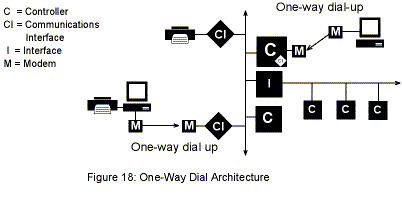
Two modems are required, one located at the remote computer
and one at the system site. Typically, the DDC operating software must be
installed on the remote computer.
Communication
Communication between two different devices controlling
equipment, requires a common protocol, a common communication speed and
known data formatting. Vendors build their devices around these criteria,
so communication between devices by the same manufacturer is
routine.
Third Party
Interfaces
In many installations, it is
desirable for a proprietary building DDC system to communicate with other
proprietary DDC systems controlling pieces of equipment. Examples would
include a building DDC system and a chiller DDC system (Figure 19) or a
fume hood DDC system. Communication between the two systems will require
an interface or gateway, due to different proprietary protocols,
communication speeds and data formatting.
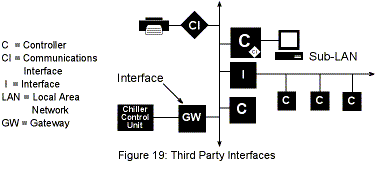
The gateway or interface translates protocol between the two
proprietary systems. The proper operation of the gateway is dependent on
the continued use of the specific revised levels of software on both
systems. It typically requires the support of the manufacturer at the
corporate level to implement and cooperation between the manufacturers. In
addition, the costs can vary widely.
Protocols
In the DDC world, there are the three classifications of
protocols: closed protocol, open protocol and standard
protocol.
A closed protocol is a proprietary protocol used by a
specific equipment manufacturer. An open protocol system uses a protocol
available to anyone, but not published by a standards organization. A
standard protocol system uses a protocol available to anyone. It is
created by a standards organization.
Open
Systems
An open system is defined as a system
that allows components from different manufacturers to co-exist on the
same network. These components would not need a gateway to communicate
with one another and would not require a manufacturer specific workstation
to visualize data. This would allow more than one vendor’s product to meet
a specific application requirement.
The sole use of an open or standard protocol does not
guarantee that a DDC system will be an open system. A manufacturer has the
ability to use open or standard protocols, yet create a closed system,
thus continuing a building owner’s dependence on a single manufacturer.
This can be accomplished by using unique communication speeds, unique data
formatting and by not adopting the full range of an open protocol.
Note: A building owner/engineer should thoroughly research a
manufacturer’s claim of an open system.
BACNET
BACNET is a standard protocol published by a standards
organization (American Society of Heating, Refrigerating and
Air-conditioning Engineers or ASHRAE). It is a specification for a
protocol. DDC vendors create a communication protocol that complies with
this specification.
BACNET is a relatively complex standard. The standard
defines protocol implementation conformance statements (PICS) that define
different levels of compliance. A given vendor may or may not support the
level required for a given application. In other words, a vendor could
meet a very low level of compliance and be BACNET-compatible. The key
question is, “At what level?”
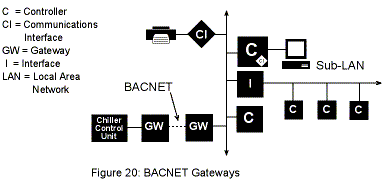
In Figure 20 the chiller control unit’s DDC will communicate
with the building DDC system if each has a BACNET gateway and their PICS
match.
Native
BACNET
If a vendor states their product is native BACNET, they
are using the BACNET protocol in lieu of a proprietary protocol on their
LAN. In Figure 20, a native BACNET building system would be able to
communicate to the chiller control DDC with one less gateway.
Overlay
Systems
An overlay system is a high-end
workstation that communicates with multiple manufacturers’ proprietary EMS
systems. An overlay system supplier creates drivers to “talk” to the
different systems. The vendors must have a cooperative relationship and
revision control is important for continued successful use. The
workstation typically displays data, allows manual control and setpoint
changes, and handles alarms and messaging. Any detailed editing of the
control sequence will still require knowledge of the underlying
proprietary software.
LON
The
Echelon Corporation has created an open protocol that uses a standard
processor and a set of standard transceivers, which allows components from
different manufacturers to co-exist on the same LAN. The protocol is
available to anyone and is called LONTALK. A unique chip is required for
any device that uses LON. Standard network variable formats have been
established to allow the transfer of data from one device to another
regardless of origin.
Presently, various vendors are competing to become the
defacto standard for the network database structure. The network database
is a map of the components and the relationship of the data moving between
them. The operator workstation needs this structure to visualize the
data.
Software suppliers providing the software for the operator
workstation may be independent of those providing the software for the
database structure and the EMS vendors.
Return to DDC
Home
|